Showing posts with label android. Show all posts
Showing posts with label android. Show all posts
Saturday, August 30, 2014
Adobe Photoshop for Samsung Galaxy and other Android Phones

Adobe Photoshop is now available for android phones.
The name of the app is Adobe Photoshop Express by Adobe Systems
But dont expect that this app has same functions as the desktop version.
However, I can say that this app has better editing and retouching features than the Instagram can offer. Here are the editing features of Adobe Photoshop Express!


Another edge of this app is that you can directly post your pictures in
- photoshop.com
As a default, only the pictures from your phone memory will show on the list of photos to be edited/uploaded.
How to enable other photos from your SD card?
tap the MENU button of your phone,

tap More

tap Settings

unchecked Show camera photos only in Phone view
Here is the download link for this app
https://play.google.com/store/apps/details?id=com.adobe.psmobile&feature=search_result

Thursday, August 21, 2014
How to get rid of annoying mobile ads on your Android Phone
Sometimes when you try to download android apps from Google play app store or play downloader games like Angle Bird, they sometimes push annoying ads to your smartphone, and you find it really boring that you want to remove all the annoying ads on your android device. But how to get rid of these annoying mobile ads on Android Phone?
 Being a long android lover, I have discovered a list of good tips and powerful apps for you here. If you have the same problem, Follow the Tutorials to have a try and you will find it really useful.
1. Download free app called AirPush Detector
 AirPush Detector is the app that detects other installed applications to see which apps appear to use notification ad frameworks and users can easily uninstall them.
The app cant block ads, but at least it can tell you which apps are causing them. So you must uninstall the app to stop the ads.
Now for the trick
2. If your phone is rooted, you can try AdFree and AdAway. Both of the apps are free.
AdFree removes most ads in the browser and other apps. It does this by nullifying requests to known host names in the system hosts file, and AdAway is a similar app like AdFree.
3. To some extent, in my eyes, the ads are there to support developer to keep Develop innovation product. If you really want to remove them, the easiest way is to use your phone offline whenever you are using the add supported app.
Read More..

1. Download free app called AirPush Detector
The app cant block ads, but at least it can tell you which apps are causing them. So you must uninstall the app to stop the ads.
Now for the trick
- After youve detected and deleted the apps which push ads, head to the Google Play Store.
- Once inside the Play Store, tap on Settings.
- Inside Settings, uncheck "Google AdMob Ads�, this will make sure that you will no longer receive targeted ads from Google.
2. If your phone is rooted, you can try AdFree and AdAway. Both of the apps are free.
AdFree removes most ads in the browser and other apps. It does this by nullifying requests to known host names in the system hosts file, and AdAway is a similar app like AdFree.
3. To some extent, in my eyes, the ads are there to support developer to keep Develop innovation product. If you really want to remove them, the easiest way is to use your phone offline whenever you are using the add supported app.
Tuesday, August 19, 2014
Best 20 Android Application on Year 2011
Best 20 Android Application on Year 2011 - The number of applications in the Android Market may not be as much as in the (Apple) App Store. Even so, the number of applications in the Android Market today arguably more than enough and will continue to grow rapidly.
Until December 2011, more than 10 billion apps have been downloaded from the Android Market. That number has increased rapidly, due in July 2011, the number of applications that are downloaded only about 6 billion.
Of the thousands of android applications available in Android Market, here are 20 apps that are useful and help the productivity of the users of the Android, especially for professionals and businessmen.
1. Google Voice
Google Voice offers free phone management service. Users can enter a phone number, in accordance with the desired. You can separate a particular phone number, that number can only contact you at a certain hour. In addition, Google Voice messages can automatically transform voice into an email or SMS.
2. Advanced Task Killer
Wasteful consumption of battery on a smartphone because many applications are running in the background. If you want the battery consumption is not too extravagant, you should put some actual applications are not being used it. By using the Advanced Task Killer, the user can shut down all applications running in the background. This application is even more effective than Task Manager.
3. Dropbox
Dropbox can be called as an application that replaces the function of the flash disk as a data storage media. Only, Dropbox accessible online and not have to use a computer.
4. Evernote
Evernote is a good application for registration (notes). In terms of storing data, Evernote is similar to Dropbox. You can keep notes on the smartphone, tablet, or computer. You also can open the Evernote note that with any device.
5. Taskos
Arguably Taskos application "to-do list" best in Android, because its design is simple and easy to operate. Taskos also has particularly reliable voice recognition features that can translate sound into a "to-do items". Although there is still a letter that is not true in the "to-do item" is, you just simply fix one or two words.
6. DroidAnalytics
DroidAnalytics used to present statistical data visualization daily, weekly and annual website to install the Google Analytic. Google so far has no official application like Google Analytic for Android and iPhone. Therefore, DroidAnalytics application can be called as the best application for Google Analytic.
7. Documents To Go
Documents To Go Free version provides service to read Microsoft Word files and Microsoft Excel. You can upgrade to a version of Documents To Go paid (15 dollars) if you want to get the feature "editing" and to add in order to view and edit PowerPoint files. After the Documents To Go, QuickOffice mobile Office application into which is also recommended.
8. Google Docs
Google Docs provides a web-based data management service for free. If you often work with Google Docs, including Microsoft Office files to upload to Google Docs, an application that you need is Google Docs. Google Docs for Android will allow you to read or edit documents.
9. TripIt
TripIt is the best application to record all travel schedules. You simply forward the email confirmation airline schedules, hotels, rental cars and other things that support your journey. After that TripIt app will set it properly.
10. Google Places
This application lets you find shop and other services that are near your current location. You can find restaurants, doctors, clinic by taxi. Places are very accurate in finding the data because it uses the information in Google Local and already integrated with Google Maps.
11. Astro File Manager
Astro File Manager is an application that lets you navigate to the file system Android. Astro also provides backup features, connectivity via Bluetooth, file compression, downloader, search for files, task manager, open the attachment, and others.
12. Speed ??Test
Useful to test your bandwidth speed Android smartphone. This application will provide information volatile movements 3G/4G connections and check the quality of the WiFi on where you are.
13. Amazon Kindle
If you are not an Amazon Kindle device users, it does not mean you do not use Amazons Kindle app for Android. An application for storing and displaying electronic books (e-book) and other digital media. Since its release, many people are drawn to the Amazon Kindle since this application helps users read e-books wherever and whenever.
14. Google +
Since its release last July, Google has become a source permbicaraan + because it is more interactive. + Google introduces new services such as Circles, Hangouts, Sparks, and Huddles. As a new social media, Google + predicted to rival the social networking giant Facebook.
15. TED Water
TED stands for Technology, Entertainment, and Design. This application can enlighten the public as it offers a variety of thoughts and ideas of leaders and influential people in the world. You can just listen, read, or seen what TED Water delivered through the video. All findings and new ideas can be found through the TED Water.
16. Google Goggles
If you usually enter the text to do a search on Google, with Google Goggles then you can use images to do a search. Simply photograph the object using a camera, Google Goggles will find everything related to the image.
One of the coolest features of Google Goggles is the ability to take pictures of text in a foreign language, then this application will translate it for you. If you are on holiday abroad, this application can help you read the road markings and other signs.
17. Photoshop Express
Who does not know image editing application/best photo in the world, Photoshop. Application of the desktop computer version is now available for the Android platform. After photographing, you can directly edit the pictures, cropping, adjust brightness, sharpen, and so on.
18. Audible
If the application is used to read the Amazon Kindle e-books, Audible audiobook features. You can connect to the library and instantly download Audible audiobooks.
19. Shazam
If by chance you hear a song on the radio but did not know who the singer and what the title, Shazam will help provide answers. Allow this application to listen to the song for 15 seconds, will automatically be processed on the database, with instant information about the song will appear on your smartphone screen. Shazam has a success rate around 80%.
20. Google Finance
This is a great little application. Google Finance on Android phones connected with your Google Finance account, where you can adjust the list of stocks and companies that want to monitor and sort them into the portfolio. This application provides three tabs is simple - look at the market, look at your portfolio, and the latest market news. Google Finance is very fitting for the businessmen who constantly monitor stock movement. (kompastekno)
Read More..
Until December 2011, more than 10 billion apps have been downloaded from the Android Market. That number has increased rapidly, due in July 2011, the number of applications that are downloaded only about 6 billion.
Of the thousands of android applications available in Android Market, here are 20 apps that are useful and help the productivity of the users of the Android, especially for professionals and businessmen.
1. Google Voice
Google Voice offers free phone management service. Users can enter a phone number, in accordance with the desired. You can separate a particular phone number, that number can only contact you at a certain hour. In addition, Google Voice messages can automatically transform voice into an email or SMS.
2. Advanced Task Killer
Wasteful consumption of battery on a smartphone because many applications are running in the background. If you want the battery consumption is not too extravagant, you should put some actual applications are not being used it. By using the Advanced Task Killer, the user can shut down all applications running in the background. This application is even more effective than Task Manager.
3. Dropbox
Dropbox can be called as an application that replaces the function of the flash disk as a data storage media. Only, Dropbox accessible online and not have to use a computer.
4. Evernote
Evernote is a good application for registration (notes). In terms of storing data, Evernote is similar to Dropbox. You can keep notes on the smartphone, tablet, or computer. You also can open the Evernote note that with any device.
5. Taskos
Arguably Taskos application "to-do list" best in Android, because its design is simple and easy to operate. Taskos also has particularly reliable voice recognition features that can translate sound into a "to-do items". Although there is still a letter that is not true in the "to-do item" is, you just simply fix one or two words.
6. DroidAnalytics
DroidAnalytics used to present statistical data visualization daily, weekly and annual website to install the Google Analytic. Google so far has no official application like Google Analytic for Android and iPhone. Therefore, DroidAnalytics application can be called as the best application for Google Analytic.
7. Documents To Go
Documents To Go Free version provides service to read Microsoft Word files and Microsoft Excel. You can upgrade to a version of Documents To Go paid (15 dollars) if you want to get the feature "editing" and to add in order to view and edit PowerPoint files. After the Documents To Go, QuickOffice mobile Office application into which is also recommended.
8. Google Docs
Google Docs provides a web-based data management service for free. If you often work with Google Docs, including Microsoft Office files to upload to Google Docs, an application that you need is Google Docs. Google Docs for Android will allow you to read or edit documents.
9. TripIt
TripIt is the best application to record all travel schedules. You simply forward the email confirmation airline schedules, hotels, rental cars and other things that support your journey. After that TripIt app will set it properly.
10. Google Places
This application lets you find shop and other services that are near your current location. You can find restaurants, doctors, clinic by taxi. Places are very accurate in finding the data because it uses the information in Google Local and already integrated with Google Maps.
11. Astro File Manager
Astro File Manager is an application that lets you navigate to the file system Android. Astro also provides backup features, connectivity via Bluetooth, file compression, downloader, search for files, task manager, open the attachment, and others.
12. Speed ??Test
Useful to test your bandwidth speed Android smartphone. This application will provide information volatile movements 3G/4G connections and check the quality of the WiFi on where you are.
13. Amazon Kindle
If you are not an Amazon Kindle device users, it does not mean you do not use Amazons Kindle app for Android. An application for storing and displaying electronic books (e-book) and other digital media. Since its release, many people are drawn to the Amazon Kindle since this application helps users read e-books wherever and whenever.
14. Google +
Since its release last July, Google has become a source permbicaraan + because it is more interactive. + Google introduces new services such as Circles, Hangouts, Sparks, and Huddles. As a new social media, Google + predicted to rival the social networking giant Facebook.
15. TED Water
TED stands for Technology, Entertainment, and Design. This application can enlighten the public as it offers a variety of thoughts and ideas of leaders and influential people in the world. You can just listen, read, or seen what TED Water delivered through the video. All findings and new ideas can be found through the TED Water.
16. Google Goggles
If you usually enter the text to do a search on Google, with Google Goggles then you can use images to do a search. Simply photograph the object using a camera, Google Goggles will find everything related to the image.
One of the coolest features of Google Goggles is the ability to take pictures of text in a foreign language, then this application will translate it for you. If you are on holiday abroad, this application can help you read the road markings and other signs.
17. Photoshop Express
Who does not know image editing application/best photo in the world, Photoshop. Application of the desktop computer version is now available for the Android platform. After photographing, you can directly edit the pictures, cropping, adjust brightness, sharpen, and so on.
18. Audible
If the application is used to read the Amazon Kindle e-books, Audible audiobook features. You can connect to the library and instantly download Audible audiobooks.
19. Shazam
If by chance you hear a song on the radio but did not know who the singer and what the title, Shazam will help provide answers. Allow this application to listen to the song for 15 seconds, will automatically be processed on the database, with instant information about the song will appear on your smartphone screen. Shazam has a success rate around 80%.
20. Google Finance
This is a great little application. Google Finance on Android phones connected with your Google Finance account, where you can adjust the list of stocks and companies that want to monitor and sort them into the portfolio. This application provides three tabs is simple - look at the market, look at your portfolio, and the latest market news. Google Finance is very fitting for the businessmen who constantly monitor stock movement. (kompastekno)
Saturday, August 16, 2014
Walkman Android F800 Released by Sony
Walkman Android F800 | Sony back release the new Walkman that designed as like as smartphone. Its named by F800, This media player using Android 4.0 Ice Cream sandwich Operation System
Walkman android f800 have multi touch on size 3.5 inch, using processor tegra 2 dual-core. Walkman Android f800 have equipped by feature S master MX digital Amplifier, clear audio and speaker xLOUD. F800 equipped by bluetooth and wi-fi.
Sony provide some storage option for this walkman android f800, 8 GB, 16 GB, and 32 Gb. This media player can used for 4.5 hours continuously for playback video. Sony priced for 16GB $269 and for 32GB $299. about new this sold, its walkman android f800 will sold in the first august through sony stores.


Read More..
Walkman android f800 have multi touch on size 3.5 inch, using processor tegra 2 dual-core. Walkman Android f800 have equipped by feature S master MX digital Amplifier, clear audio and speaker xLOUD. F800 equipped by bluetooth and wi-fi.
Sony provide some storage option for this walkman android f800, 8 GB, 16 GB, and 32 Gb. This media player can used for 4.5 hours continuously for playback video. Sony priced for 16GB $269 and for 32GB $299. about new this sold, its walkman android f800 will sold in the first august through sony stores.


Friday, August 15, 2014
Android 5 0 Jelly Bean Coming in 2012
Android 5.0 Jelly Bean Coming in 2012 - Android 5.0 Jelly Bean scandalous world of gadget. Gadget world has just introduced the Android 4.0 Ice Cream Sandwich where the distribution of all Droid to get the upgrades have not been completed, Google will make a splashy world of gadgets again poised to release Android 5.0. Indeed there has been no official statement from Google about this party, but is not directly over the Mobile World Congress 2012 held in Barcelona, they signal about the name Android 5.0 later.

During the MWC 2012 in Fira de Barcelona Spain, Google being the biggest booth in allcorners MWC convention center area and also the most easily accessible. There,everyone will find a lot of scattered green robot, plus a number of gadgets that areconfirmed using the Android OS to make it was as though the event MWC 2012 Barcelona indirectly it is even Google. Reasonable indeed, especially with the support ofthe fact that the activation of Android handsets recorded the highest, reaching 850 000per day. And the concern is at one corner of Googles booth was placed a tabledecoration looks a bit odd. Develop a large bowl on top tardapat containing the Jelly Bean.
Could this signal that Android 5.0 will be called the Jelly Bean?
This is reinforced by the statement of corporate vice president of ASUS Benson Lin "inan interview with TechRadar. He mentioned that because of its proximity to the Google, it looks like the company would re-gain the shelter of the Android 5.0 update first. Lin thenadd also that the epithet OS version 5.0 is the Jelly Bean. As we all know that the ASUS Tablet seed which is also the first Droid which uses quad-core processor Tegra 3 "ASUS Eee Pad Transformer Prime" also became the first to get Android Ice Cream Sandwich after the Galaxy Nexus.

And yet we also get detail what it will be Android 5.0 "Jelly Bean", there have been otherrumors through the Verge of mention if Android 6.0 will be labeled "Key Lime Pie" isone of the typical American desserts. Googles own party have not been willing toprovide official information about when they will release it the Android 6.0. But if you lookat the current state, where the Android 4.0 Ice Cream Sandwich alone has not beenevenly spread. Could be the new Android 5.0 appeared earlier in the year 2012 third quarter and Key Lime Pie is not expected to be introduced in early 2013.
Key Lime Pie word comes from the typical American makananpencuci mlut the dough is made from a combination of lime juice, plus eggs and milk are superimposed on thepie. That was a glimpse of predictions about the coming of the new operating systemfrom Google that will be released soon replace Ice Cream Sandwich. Jelly Bean Will Android 5.0 be true or just rumors? so we wait for the presence of this Android 5.0 Jelly Bean.
Tuesday, August 12, 2014
Android Wireless Charging Options Nokia Fatboy Pillow and Others Updated
Nokia showed the innovative and dazzling Wireless Charge to us with its Lumia 920 and 820 in 2012, and nowadays, the technology adopted slowly by the industry gradually become a hot dog and is a technology that once you have, you really never want to live without. Apart from Nokia�s Lumia, Google�s Nexus 4 and HTC Droid DNA also contribute a lot to make the technology mainstream. Today, we are going to take a close look at the Fatboy Pillow and the charging plate and others.Both of Fatboy Pillow and the charging plate are from Nokia (both built to the Qi standard, so yes they work with Android phones).

Nokia Fatboy Charging Pillow
The pillow (made by Fatboy) is high quality. Filled with a soft material, the material feels great and the seams are sewn very well. The Fatboy Charging Pillow comes in a few colors: yellow, blue, white, red, and black and you can get it at Verizon and AT&T stores for around $60.

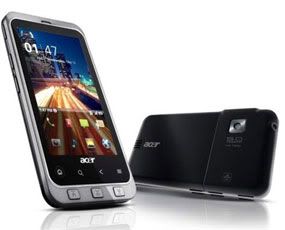 Jakarta - After a series comes with Liquid E, Acer again brings new Android phone called Acer Stream. In contrast with Liquid E, Stream is intended for high-end market. With the presence of these products, Acer as a new player in the smartphone market so much more mature.
Comes with Qualcomms Snapdragon 1GHz processor and 512 MB RAM, this product became one of the best Android phone is currently owned by Acer. Additional element in the form of 2 GB of internal flash memory makes it suitable to download a variety of applications in the Android Market.
Judging from his OS, by default Stream is still using the Android version 2.1 (Eclair). But in recent months, Acer Stream can be increased to the Android 2.2 (Froyo). At first glance, when observed product design is similar to the HTC Desire, if the Acer logo in the center is closed. In general, this phone looks very solid and thin.
Talking about HTC, the Taiwanese vendors have a User Interface (UI) that is very captivating called Sense. Well, apparently Acer is not to be outdone by HTC Sense. Besides having built-in Android UI, Acer Stream comes with a UI of it own called the Acer UI 4.
Read More..
The pillow (made by Fatboy) is high quality. Filled with a soft material, the material feels great and the seams are sewn very well. The Fatboy Charging Pillow comes in a few colors: yellow, blue, white, red, and black and you can get it at Verizon and AT&T stores for around $60.

To get the charge start, simply drop your wireless-ready phone in the middle and it begins to charge. The feeling is incredible. There are no beeps or notifications, so youd better to double check to make sure its charging while you are using it for the first time.
Nokia Wireless Charging Plate
The plate is made of plastic, and the color is exactly like the phone. It also comes in blue, yellow, red, white and black, while retailing for around $50.
Nokia Wireless Charging Plate
The plate is made of plastic, and the color is exactly like the phone. It also comes in blue, yellow, red, white and black, while retailing for around $50.
It may be my choice if I had to choose one between them. It�s small and convenient, does the trick, and also comes equipped with the extra-long power cable. I favor this over the pillow.
 To charge, just simply lay your phone on it, centered over the Nokia logo. It is very easy to use. It also has a rear LED light that notifies you that your phone is charging.
LG Mobile WCP400 Wireless Charging Orb Nexus 4


LG Mobile WCP400 Wireless Charging Orb Nexus 4
News from androidcentral report that Nexus 4 charging orb listed online from Pure Mobile for $60, but its out of stock. Now I have verified the link and find it is available now. So for those who says that charging plate and pillow may not work all that well with the Nexus 4, go to puremobile website to have a check.
Read More..
Monday, August 11, 2014
Acer Stream Android top of Acer
Comes with Qualcomms Snapdragon 1GHz processor and 512 MB RAM, this product became one of the best Android phone is currently owned by Acer. Additional element in the form of 2 GB of internal flash memory makes it suitable to download a variety of applications in the Android Market.
Judging from his OS, by default Stream is still using the Android version 2.1 (Eclair). But in recent months, Acer Stream can be increased to the Android 2.2 (Froyo). At first glance, when observed product design is similar to the HTC Desire, if the Acer logo in the center is closed. In general, this phone looks very solid and thin.
Talking about HTC, the Taiwanese vendors have a User Interface (UI) that is very captivating called Sense. Well, apparently Acer is not to be outdone by HTC Sense. Besides having built-in Android UI, Acer Stream comes with a UI of it own called the Acer UI 4.
Subscribe to:
Posts (Atom)