Showing posts with label your. Show all posts
Showing posts with label your. Show all posts
Tuesday, August 26, 2014
Simple Ways to improve your Windows Phone 8 Battery Life
Obviously, most of people nowadays own either an android or an iOS smartphone in their pockets. Today, Windows Phone 8, the latest and greatest mobile operating system from Microsoft joins in the war. Now several different Windows Phone 8 models like Nokia Lumia 920 and 820, HTC Windows phone 8X gradually go on sale in store.
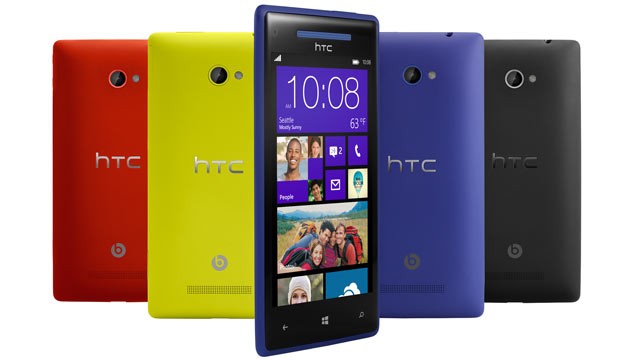 For most of us, we use the phone to watch videos, play funny games, and chat with friends, definitely powerful and useful for us. But all of them fail in giving a long battery life, which let us feel down.
So here I collected some information on how to extend the battery life of your Windows Phone 8 as a result now there are so many information about how to improve your iPhone or android device battery life in life.
What should you do when Power Down

Close Wi-Fi,Bluetooth and GPS/Location: All of them will drain your battery very quickly, soTurn them off if youre not using the phone.
Dim screen brightness: The brighter your screen, the faster you�ll eat up battery life. So dim your screen if you want make your battery last longer.
Turn off push email: If you have an email account on your device, think about whether you need emails pushed to it, or if you could change the settings to look for emails when you open the account.
Windows Mobile - Settings in emails account > Synchronisation settings > Download new content
Set your phone in Airplane mode: If you dont want to completely shut off your phone, switch to airplane mode to shut off all of the radios, and switch back out of airplane mode only when you need to make a call or send a text message.
Close unnecessary apps: A lot of applications continue to run in the background or get their own push notifications. Close these applications to ensure that your phone isnt still pinging the network without your knowledge.
Charge backups: Carry a fully charged spare battery and also buy a portable phone charger around 10,000mah and it will charge your phone in no time.
Use Battery Level for WP8 Apps to help you
Developed by Alex Golesh, it is such a simple app which provides "missing feature" of Windows Phone 8 - the battery level percentage on the main screen and the lock screen. You can just pin the app to see Live Tile with battery status and remaining charge percentage on Windows Phone 8 main screen and lock screen.
The app is completely free.
 Once there have more battery Saver Apps update in Windows phone 8 app store,I will offer to you in time.
Other Tips
You should turn off the screen display immediately when finished with tasks, just hit the power button quickly to turn off the display for battery saving.
Read More..
So here I collected some information on how to extend the battery life of your Windows Phone 8 as a result now there are so many information about how to improve your iPhone or android device battery life in life.
What should you do when Power Down

When your battery is running low, Windows Phone 8 has a special trick to help prevent total power loss. Just go to Settings and turn on the Battery Saver option. Doing so tells the OS not to run any apps in the background or sync email automatically. You�ll still be able to make and receive calls and texts, but everything else will require manual syncing (opening up the app and choosing to sync). You can choose for Battery Saver mode to kick in only when your battery is actually low, or keep it on at all times. A little heart over the battery icon tells you when the phone is in Battery Saver mode.
Close Wi-Fi,Bluetooth and GPS/Location: All of them will drain your battery very quickly, soTurn them off if youre not using the phone.
Dim screen brightness: The brighter your screen, the faster you�ll eat up battery life. So dim your screen if you want make your battery last longer.
Turn off push email: If you have an email account on your device, think about whether you need emails pushed to it, or if you could change the settings to look for emails when you open the account.
Windows Mobile - Settings in emails account > Synchronisation settings > Download new content
Set your phone in Airplane mode: If you dont want to completely shut off your phone, switch to airplane mode to shut off all of the radios, and switch back out of airplane mode only when you need to make a call or send a text message.
Close unnecessary apps: A lot of applications continue to run in the background or get their own push notifications. Close these applications to ensure that your phone isnt still pinging the network without your knowledge.
Charge backups: Carry a fully charged spare battery and also buy a portable phone charger around 10,000mah and it will charge your phone in no time.
Use Battery Level for WP8 Apps to help you
Developed by Alex Golesh, it is such a simple app which provides "missing feature" of Windows Phone 8 - the battery level percentage on the main screen and the lock screen. You can just pin the app to see Live Tile with battery status and remaining charge percentage on Windows Phone 8 main screen and lock screen.
The app is completely free.
Other Tips
You should turn off the screen display immediately when finished with tasks, just hit the power button quickly to turn off the display for battery saving.

Thursday, August 21, 2014
How to get rid of annoying mobile ads on your Android Phone
Sometimes when you try to download android apps from Google play app store or play downloader games like Angle Bird, they sometimes push annoying ads to your smartphone, and you find it really boring that you want to remove all the annoying ads on your android device. But how to get rid of these annoying mobile ads on Android Phone?
 Being a long android lover, I have discovered a list of good tips and powerful apps for you here. If you have the same problem, Follow the Tutorials to have a try and you will find it really useful.
1. Download free app called AirPush Detector
 AirPush Detector is the app that detects other installed applications to see which apps appear to use notification ad frameworks and users can easily uninstall them.
The app cant block ads, but at least it can tell you which apps are causing them. So you must uninstall the app to stop the ads.
Now for the trick
2. If your phone is rooted, you can try AdFree and AdAway. Both of the apps are free.
AdFree removes most ads in the browser and other apps. It does this by nullifying requests to known host names in the system hosts file, and AdAway is a similar app like AdFree.
3. To some extent, in my eyes, the ads are there to support developer to keep Develop innovation product. If you really want to remove them, the easiest way is to use your phone offline whenever you are using the add supported app.
Read More..

1. Download free app called AirPush Detector
The app cant block ads, but at least it can tell you which apps are causing them. So you must uninstall the app to stop the ads.
Now for the trick
- After youve detected and deleted the apps which push ads, head to the Google Play Store.
- Once inside the Play Store, tap on Settings.
- Inside Settings, uncheck "Google AdMob Ads�, this will make sure that you will no longer receive targeted ads from Google.
2. If your phone is rooted, you can try AdFree and AdAway. Both of the apps are free.
AdFree removes most ads in the browser and other apps. It does this by nullifying requests to known host names in the system hosts file, and AdAway is a similar app like AdFree.
3. To some extent, in my eyes, the ads are there to support developer to keep Develop innovation product. If you really want to remove them, the easiest way is to use your phone offline whenever you are using the add supported app.
Sunday, August 10, 2014
Twitter app for your phone

by Twitter, Inc.
DOWNLOAD
This twitter application allows multiple accounts to be saved and then use at a time (which makes it easier for those who have multiple twitter accounts).
How to sign in your account?

Signing in your account is same as adding your account in the list.
To sign in or add an account.
tap the Menu --> Settings

then tap the Add account

To select an account to be use
tap the Menu --> Accounts

then tap the account you want to use.
How to Signout your account?

 Signing out your account is same as deleting your account in the list.
To sign out or delete the account
tap the Menu --> Settings
then tap the account you want to delete.
Scroll down and tap the Remove account
then tap OK

tap the Menu --> Settings
then select the account that you want to manage.
You must check first the Sync data

then adjust this Notification indicators area
Subscribe to:
Posts (Atom)